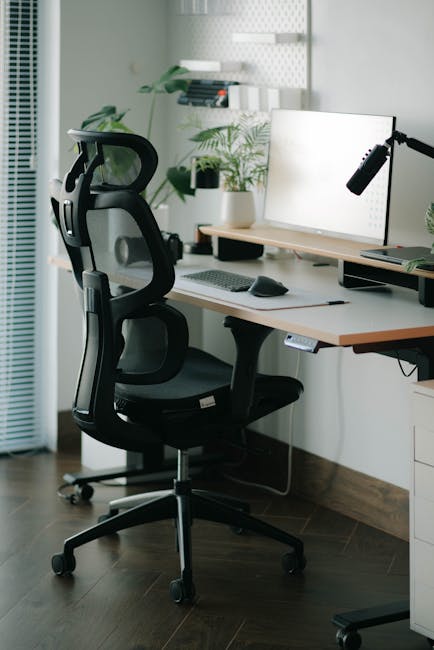
Are you spending long hours seated at your desk, whether in a downtown Johnson City office, a SUNY Broome classroom, or your cozy home office overlooking the Susquehanna River? Like millions of Americans, Johnson City residents are discovering that uncomfortable workspaces can contribute to a sore back, stiff neck, and long-term spine health issues. As a chiropractor serving the Southern Tier, I see these complaints every day. The good news? Small changes to your workspace can make a big difference for your spine.
Why Workspace Ergonomics Matter
Johnson City’s growing professional and remote workforce means more people are glued to screens than ever. Our local weather—with brisk winters and hot, humid summers—can make outdoor breaks less appealing, resulting in more time at the desk. Over time, poor posture at work can lead to:
- Chronic back pain
- Neck stiffness and headaches
- Nerve impingements
- Reduced productivity and increased fatigue
A spine-friendly workspace can help prevent discomfort and support long-term well-being, whether you work downtown, at the UHS Wilson Medical Center, or from a home office in Floral Park.
Assessing Your Current Workspace
Begin by evaluating your setup. Ask yourself these questions:
- Is my chair supporting my lower back?
- Are my feet flat on the floor?
- Is my screen at eye level?
- Do I reach far for my keyboard or mouse?
If you answered “no” to any, you may be placing unnecessary strain on your spine.
The Best Spine-Friendly Office Chair
A supportive chair is essential for any workspace. In Johnson City’s mix of historic buildings and modern offices, your chair may be inherited or a budget buy. Regardless, look for:
- Adjustable seat height and tilt
- Lumbar support (lower back curve)
- Comfortable padding
- Armrests that allow your shoulders to relax
If your chair lacks lumbar support, a small pillow or a rolled-up towel placed at the small of your back is an easy fix.
Desk and Monitor Placement Tips
Proper monitor height and distance prevent slouching and craning your neck, especially during long Binghamton winters when you may be working indoors for months.
- Monitor height: The top of your screen should be at—or just below—eye level.
- Distance: Place screens about arm’s length away.
- Keyboard and Mouse: Keep them close to avoid reaching, allowing your elbows to remain at your sides (about a 90-degree angle).
Foot Position: Don’t Let Your Feet Dangle
Whether you work from a Johnson City coworking space or at your kitchen table, your feet should be flat on the floor. If they can’t reach, use a footrest or even a sturdy box.
Stand Up and Move: Local Life Solutions
Our region’s scenic parks like CFJ Park or the Vestal Rail Trail offer the perfect opportunity for short, rejuvenating walks. Set a timer to remind yourself to stand or stretch every 30–60 minutes. Even a lap around your office or a brisk stroll in the hallway can boost circulation and break the cycle of slouching.
Try these quick movements:
- Reach both arms overhead, elongate your spine for a gentle stretch.
- Gently roll your shoulders backward.
- Do a simple twist in your chair to the left and right for spinal mobility.
Lighting and Screen Glare
Johnson City experiences dramatic shifts in daylight, exaggerating screen glare headaches and encouraging poor posture as you squint. Orient your desk to take advantage of natural light without direct glare on your monitor. Use blinds or curtains and opt for soft, adjustable desk lamps to reduce eye strain.
The Rise of Standing Desks
Standing desks are gaining popularity nationwide—and in the Southern Tier—because they allow you to alternate between sitting and standing. If you choose to use a standing desk:
- Start by standing for just 15–30 minutes at a time.
- Shift your weight occasionally.
- Use a floor mat and wear comfortable shoes to support your feet and lower back.
Make Your Home Office Spine-Safe
For those working remotely in Johnson City, you might not have traditional office furniture. Here are spine-safe home solutions:
- Use a firm pillow for added seat or lower back support.
- Stack books under monitors or laptops to raise the screen.
- Repurpose a kitchen counter as a standing desk option.
Don’t Forget Hydration and Breaks
It’s easy to become engrossed in work and forget to move or drink water, especially during cold upstate winters when you might not feel thirsty. Keep a water bottle at your desk and use it as a cue to take micro-breaks—refill, stretch, and reset your posture at least once each hour.
When to Seek Professional Help
If you’re experiencing persistent pain, numbness, or tingling, don’t ignore the signs. Chronic symptoms may indicate underlying conditions that require chiropractic or medical attention. Local chiropractors familiar with Johnson City’s lifestyle can provide personalized advice and care ideas, tailored to your needs.
Final Thoughts: Make Small Changes Today
Transforming your workspace doesn't require a total overhaul. Start with small adjustments—add a cushion, raise your screen, take more breaks—and your back will thank you. As a proud member of the Johnson City community, I encourage you to treat your spine with care, so you can enjoy all that our vibrant area has to offer, from energetic downtown life to tranquil riverside parks.
Your health is your foundation. Make your workspace a place where your spine can thrive!